

Here are current PTZ camera IR commands that can be done from the supplied IR remote control
1. Standby Key
After 3s long press, the camera will step into standby mode. Long press 3s again, the camera will self- check again and back to HOME position.
2. Camera Address Selection
Select the camera address to control.
3. Number Key
Set or run 0-9 presets.
Press a number key 0-9 directly to run a relative preset.
4. */# Key
Key combination use.
5. Focus Control Key
Auto Focus: Enter auto focus mode.
Manual Focus: Enter manual focus mode. Switch the camera focus mode to manual focus by pressing [+] or [-] to adjust.
Focus(near): Press [+] key (Valid only in manual focus mode)
Focus(far): Press [-] key (Valid only in manual focus mode)
Press and hold the key, the action of focus will keep continue and stops as soon as the key is released.
6. Zoom Control Key
Zoom +: Lens near (Zoom in)
Zoom -: Lens far (Zoom out)
Press and hold the key, the camera will keep zooming in or out and stops as soon as the key is released.
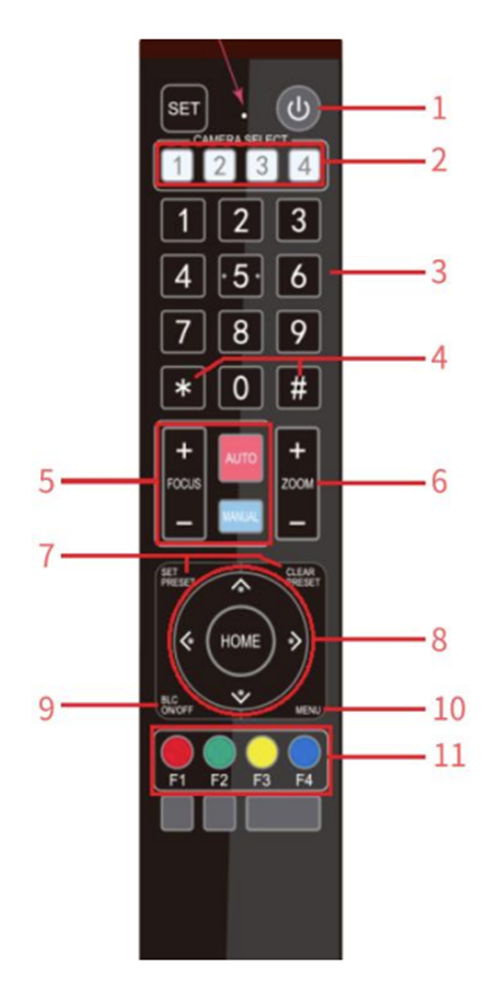
7. Set/ Clear Preset key
Set Preset: Set a preset position the users should press the [SET PRESET] key first and then press the number key 0-9 to set a relative preset.
Clear Preset key: Clear a preset position, the user can press the [CLEAR PRESET] key first and then press the number key 0-9 to clear the relative preset.
Note: 10 preset positions in total are available by remote controller. Press the [#] key three times continually to cancel all the preset.
8.Pan/ Tilt Control Key
Press ^ Key: Tilt up
Press v Key: Tilt down
Press < Key: Pan left
Press > Key: Pan right
[HOME] Key: Return to the middle position or enter the next level menuPress and hold the up/ down/ left/ right key, the pan/ tilt will keep running until it runs to the end point and the pan/ tilt running stops as soon as the key is released.
9. BLC Control Key
Back Light ON OFF: Turn on or off the back light.
10. Menu Setting
Enter/ Exit the OSD menu or return to the previous menu.
11. Camera IR Remote Control Address Setting
[*] + [#] +[F1]: Camera Address No.1 [*] + [#] +[F2]: Camera Address No.2 [*] + [#] +[F3]: Camera Address No.3 [*] + [#] +[F4]: Camera Address No.412. Key Combination Function
[#] + [#] + [#]: Clear all presets [*] + [#] + [6]: Restore factory defaults [*] + [#] + [9]: Flip switch [*] + [#] +[AUTO]: Enter into the aging mod [*] + [#] + [3]: Menu set to Chinese [*] + [#] + [4]: Menu set to English [*] + [#] +[MANUAL]: Restore the default username, password, and IP address [#] + [#] + [0]: Switch the video format to 1080P60 [#] + [#] + [1]: Switch the video format to 1080P50 [#] + [#] + [2]: Switch the video format to 1080I60 [#] + [#] + [3]: Switch the video format to 1080I50 [#] + [#] + [4]: Switch the video format to 720P60 [#] + [#] + [5]: Switch the video format to 720P50 [#] + [#] + [6]: Switch the video format to 1080P30 [#] + [#] + [7]: Switch the video format to 1080P25 [#] + [#] + [8]: Switch the video format to 720P30 [#] + [#] + [9]: Switch the video format to 720P25