
-
General FAQ
-
4K Video Encoder/Decoder
-
- How to set up ZowieBox to connect with my equipments?
- How to supply power for ZowieBox?
- What is the login account and password
- Does ZowieBox support PoE?
- My computer can't find ZowieBox at NDI tool, what should I do?
- How to set the IP address for ZowieBox?
- How to connect with Nintendo Switch?
- How to reset ZowieBox?
- Will this save the settings after being disconnected from power?
- If I didn't have LAN, how can I visit ZowieBox?
- How to connect with PS5/4 ?
- How to connect with X-Box Series?
- ZowieBox Firmware Release Notes
- SDI ZowieBox Firmware Release Notes
- How to manually update firmware for ZowieBox?
- Instructions for NDI over WIFI
- How to change device name?
- Show all articles ( 2 ) Show all articles
-
- Why doesn't ZowieBox support decoding NDI sources from VLC, NDI, OBS, etc.?
- How to Decode NDI Source
- How to decode/encode SRT to ZowieBox using vMix
- How to use NDI Discovery
- How to upgrade with USB
- How to use the UVC to HDMI function
- How to use RTMP sever
- Does ZowieBox support saving video files to local disk?
- Is it possible to decode the NDI® stream emitted by another device using ZowieBox ?
- What is the latency from encoding to rendering when using ZowieBox to transmit 4K30 signal?
- Can in record to usb and encode at the same time?
- How to check recorder status?
- Device is hot, will it has any problem?
- Does ZowieBox support OSD?
- What is the latency from encoding to rendering when using ZowieBox to transmit 4K30 signal?
- Would this be usable by a gaming console? for example, is the HDMI passthrough (with no latency) while recording to YouTube?
- Does it support power pass through? Meaning can the ZowieBox accept or provide power through the USB-C?
- Can ZowieBox switch to a still image? Like jpeg that says be right back?
- How to switch to NDI mode
- Can it get multiple NDI feeds as input?
- How to switch to Decoder mode?
- How can I use ZowieBox connect to PTZ Camera?
- How to switch HDMI loop out and output?
- If ZowieBox didn't connect LAN, how can I control the record function?
- How can I power for Monitor or PTZ Camera by ZowieBox's DC out?
- How can I use X-Box to control the PTZ Camera via ZowieBox?
- How to use video recording
- What video formats can ZowieBox create?
- How do I fix the no signal problem when capturing a 4KP60 video from PS5?
- If nothing is captured on the preview screen, what should I do?
- If you use a 3.5 plug input for audio, will that audio also pass through the HDMI output?
- How to use ZowieBox connect to Zoom?
- How to set up PC display adapter settings when ZowieBox identifies the computer signal source as having an incorrect or unsupported resolution
- How to use NAS to save video file
- What is the WiFi for?
- What USB dongles does ZowieBox support?
- No Ethernet Port on Laptop, how to extend ethernet to use NDI?
- How to perform point-to-point(P2P) video transmitter and receiver by Lan
- How to perform point-to-point(P2P) video transmitter and receiver over the Internet
- Video file can not be viewed online
- Get RTSP streaming URL
- FEELWORLD L2 Plus Multi Camera Video Mixer Switcher output cannot be detected
- Why doesn’t ZowieBox recognize Mac mini’s signal?
- How to use SRTMiniSever for streaming
- How to discover ZoiwieBox’s NDI using OBS’s NDI plugin?
- How to modify AMD graphics card parameters to make ZowieBox output normal
- Recommendations for storage device speed
- How to switch output resolution in decoder mode
- How to recover ZowieBox if it works abnormally after the upgrade
- Why 4K60/4K50/1080p120/1080p100 input is recognized as 1080p60/50 input?
- The difference between New Gen ZowieBox and ZowieBox
- How to use AVoIP/UVC to NDI function
- How to use USB MIC
- Why is the image green or unavailable when input to the monitor/ATEM?
- How to upgrade Zowietek products?
- Upgrade Troubleshooting
- How to use NDI multicast?
- Hardware Version and Compatibility
- How to configure SRT related parameters?
- SDI Incompatible Devices
- How to use NDI Discovery Sever to achieve cross-segment encoding and decoding
- How to stream to OBS by SRT
- How to use VLC to pull SRT local stream?
- How to select level A or level B for 3G SDI output
- How to switch USB between host and device mode
- How to use ZowieAPI with Bitfocus Campanion and Stream Deck for scheduled recording
- How to use the UVC function of DJI
- How to use pocket3 to streaming to ZowieBox
- How to improve ZowieBox temperature/fan sound
- How to troubleshooting when ZowieBox has no signal when connected to PS5
- Whether Zowietek Products Support Decimal Resolution Input, Encoding, and Recording
- How to Use SRT Caller, Listener, and Rendezvous Mode
- Troubleshooting for audio and video asynchrony in video recording
- How to decode Resolume Arena's NDI source
- Show all articles ( 59 ) Show all articles
-
- How to get ZowieBox working in the OBS?
- Can ZowieBox stream to multiple destinations at once?
- Is it possible to decode the NDI® stream emitted by another device using ZowieBox ?
- Does this device support RTMP(S), the secure RST that facebook is now requiring?
- How to stream to YouTube
- How to stream to Facebook?
- How to stream to Wowza
- Can it store multiple steam keys for YouTube?
- How can I solve image and sound out of sync in OBS?
- How to get ZowieBox's video in vMix?
- Do you have to create an event on Facebook and YouTube before every stream or one key works every time if i plug it in the encoder?
- How to stream to Twitch?
- How to Use OSD Scoreboards
- How to use OSD timestamps
- Suggestions for audio asynchrony during streaming to YouTube
- How to troubleshoot when ZowieBox cannot decode NDI
- How to decode a local stream
- Show all articles ( 2 ) Show all articles
-
-
4K Video Recorder
-
- Quick Start Guide
- What is ZowieREC?
- Remote Control Layout Overview
- How to record video in 4K resolution?
- How to record RCA (CVBS) input?
- How to connect with PS5/4 ?
- How to connect with X-Box Series?
- How to connect with Nintendo Switch?
- Which video signals does ZowieREC support?
- How to re-pair the remote control?
- How to playback?
- Will this save the settings after being disconnected from power?
- Which input devices does ZowieREC support?
- What is the login account and password
- How to set the IP address for ZowieBox?
- How to upgrade firmware?
- ZowieREC Firmware Release Notes
- How to upgrade with USB
- Show all articles ( 3 ) Show all articles
-
- How are video segments split?
- How to check recorder status?
- Does ZowieREC support AV port DVD player?
- Does it support scheduled recording?
- Can it record 4K60 or 1080P120?
- How to login the ZowieRec's WEB Console?
- Does it support HDCP?
- How many KB/s does this record at? (bit rate)
- Can I use it as a DVR?
- Does the recorder support HDR?
- Does it support recording 4k60?
- Does it support 2.1 or 8k hdmi cables?
- Can HDMI output 4k?
- Can I hook this up to a console to play games?
- Can this be used for surveillance systems?
- How do I get the video and audio out of my high end TV into this box? Will the HDMI cable do that or are you using other mean to accomplish this?
- Does it capture 5.1 dolby audio?
- Can I pause my recording and restart the recording when I am taking a break?
- How to use NAS to save video file
- Can it record off dish network?
- Can I watch one program while recording another?
- Can I use this to record from iphone apps?
- How to record YouTube videos to USB storage device with ZowieREC?
- Can I record videos directly from a Smart TV?
- How to use ZowieAPI with Bitfocus Campanion and Stream Deck for scheduled recording
- I want for TV to record shows. Is this easy to use and easy to fast foward though the commericals?
- After recording to USB. Can I play to tv the one recording in USB ?
- Will this play a video previously recorded on a external hard drive from a dish network receiver?
- Does it support live streaming?
- How to use RTMP sever
- Device is hot, will it has any problem?
- How to switch to loopout mode
- If you use a 3.5 plug input for audio, will that audio also pass through the HDMI output?
- How can I power for Monitor or PTZ Camera by ZowieBox's DC out?
- Can it store multiple steam keys for YouTube?
- Can ZowieBox stream to multiple destinations at once?
- How to stream to Facebook?
- How to stream to YouTube
- How to stream to Wowza
- Whether Zowietek Products Support Decimal Resolution Input, Encoding, and Recording
- How to Use SRT Caller, Listener, and Rendezvous Mode
- Troubleshooting for audio and video asynchrony in video recording
- How to adjust the fan speed if ZowieREC feels hot?
- Show all articles ( 28 ) Show all articles
-
-
4K PTZ Camera
-
- PTZ Quick Start Guide
- How to Check ZowiePTZ’s IP Address
- How to install the ZowiePTZ by wall mount
- How to install the ZowiePTZ by ceiling mount?
- IR remote control shortcuts
- Equipment installation and connection
- Led Light
- My computer can’t find ZowiePTZ at NDI tool, what should I do?
- ZowiePTZ Firmware Release Notes
-
- Meaning of indicator lights
- Suggestion for different lens working distance
- ZowiePTZ operating temperature
- How to use Tally light
- How to switch to standby mode
- How to change the IP address of ZowiePTZ by IR remote control
- How to upgrade with USB
- How to restore camera’s default IP setting and password by IR remote control
- How to restore factory defaults by Remote control
- Why does the remote control sometimes not work?
- How to change the port of ZowiePTZ by IR remote control?
- How to use NAS to save video file
- How to use USB MIC
- Why is the image green or unavailable when input to the monitor/ATEM?
- How to improve the asynchrony of audio and video during recording
- Does ZowiePTZ support saving video files to local disk?
- How to use video recording
- How to use SRTMiniSever for streaming
- Recommendations for storage device speed
- Can ZowiePTZ stream to multiple destinations at once?
- Can it store multiple steam keys for YouTube?
- How can I solve image and sound out of sync in OBS?
- How to get ZowiePTZ working in the OBS?
- Do you have to create an event on Facebook and YouTube before every stream or one key works every time if i plug it in the encoder?
- How to upgrade Zowietek products?
- Upgrade Troubleshooting
- How to use NDI multicast?
- Hardware Version and Compatibility
- How to configure SRT related parameters?
- SDI Incompatible Devices
- How to use NDI Discovery Sever to achieve cross-segment encoding and decoding
- How to use VLC to pull SRT local stream?
- How to stream to OBS by SRT
- How to use ZowieAPI with Bitfocus Campanion and Stream Deck for scheduled recording
- Whether Zowietek Products Support Decimal Resolution Input, Encoding, and Recording
- How to Use SRT Caller, Listener, and Rendezvous Mode
- Troubleshooting for audio and video asynchrony in video recording
- Show all articles ( 22 ) Show all articles
-
- What are the possible ways I can control ZowiePTZ?
- How to use STREAM DECK to control the ZowiePTZ
- Supporting Xbox Joystick control
- How to make the remote control direction correspond to the pan/tilt rotation direction
- How to control ZoiwiePTZ by ZowiePTZ software
- How to control ZowiePTZ by ZowieBox
- How to control your ZowiePTZ by vMix
- Installing the OBS plugin to your windows PC to control ZowiePTZ by OBS
- How to control ZowiePTZ by BITFOCUS Companion
- How to use serial port to control ZowiePTZ
- Username and password of Onvif protocol
- How to use PTZ IP Controller to control ZowiePTZ
-
-
4K POV Camera
-
- ZowieCam operating temperature
- How to use OSD menu to adjust output resolution
- How to use Tally Light
- How to use shortcut functions
- How to use button to operate OSD menu
- How to check ZowieCam’s IP Address
- How to adapt the button direction to the output direction
- How to perform noise reduction
- How to flip the encoding screen
- How to flip the output screen
- How to set up when the color is incorrect
- Why sometimes using the OSD menu to modify parameters is not effective?
- How to record videos with ZowieCam
- How to switch to standby mode
- Why sometimes using the OSD menu to modify parameters is not effective?
- How to set up when the color is incorrect
- How to Use OSD Scoreboards
- How to use OSD timestamps
- How to use NAS to save video file
- How to stream to Twitch?
- How to stream to Wowza
- How to stream to Facebook?
- How to stream to YouTube
- Why is the image green or unavailable when input to the monitor/ATEM?
- Suggestions for audio asynchrony during streaming to YouTube
- How to change the lens?
- How to improve ZowieCam temperature/fan sound
- How to improve the asynchrony of audio and video during recording
- How to improve the jitter of the AF model ZowieCam
- How to correct the image blur in one corner for ZowieCAM M12 AF?
- Upgrade Troubleshooting
- How to use NDI multicast?
- Hardware Version and Compatibility
- How to configure SRT related parameters?
- SDI Incompatible Devices
- How to use NDI Discovery Sever to achieve cross-segment encoding and decoding
- How to stream to OBS by SRT
- How to use VLC to pull SRT local stream?
- How to switch USB between host and device mode
- How to use ZowieAPI with Bitfocus Campanion and Stream Deck for scheduled recording
- Whether Zowietek Products Support Decimal Resolution Input, Encoding, and Recording
- How to Use SRT Caller, Listener, and Rendezvous Mode
- Troubleshooting for audio and video asynchrony in video recording
- Show all articles ( 28 ) Show all articles
-
PTZ Controller
-
- Articles coming soon
-
- User manual
- How to Connect ZowieKBD to Network and Power?
- What are the ports on the back of the ZowieKBD used for?
- How are the buttons on the ZowieKBD organized?
- What are the shortcut button functions on ZowieKBD?
- What information is shown on the ZowieKBD screen?
- How do I navigate the ZowieKBD menu with the joystick or knob?
- How to Add an NDI Camera to ZowieKBD
- How to Add an ONVIF Camera to ZowieKBD
- How to Connect a Sony VISCA Camera to ZowieKBD
- How to Set Up a VISCA Over IP Camera on ZowieKBD
- How to Add a Serial Protocol Camera to ZowieKBD?
- How to Modify or Edit an Existing Camera in ZowieKBD?
- How to Add or Edit Camera Groups in ZowieKBD?
- How to Switch Between Active Cameras or Groups in ZowieKBD?
- How to Switch Display Modes or Output Priorities on ZowieKBD?
- How to Set, Call, or Reset Presets on ZowieKBD
- Show all articles ( 2 ) Show all articles
-
- User manual
- How to Connect ZowieKBD to Network and Power?
- What are the ports on the back of the ZowieKBD used for?
- How are the buttons on the ZowieKBD organized?
- What are the shortcut button functions on ZowieKBD?
- What information is shown on the ZowieKBD screen?
- How do I navigate the ZowieKBD menu with the joystick or knob?
- How to Add an NDI Camera to ZowieKBD
- How to Add an ONVIF Camera to ZowieKBD
- How to Connect a Sony VISCA Camera to ZowieKBD
- How to Set Up a VISCA Over IP Camera on ZowieKBD
- How to Add a Serial Protocol Camera to ZowieKBD?
- How to Modify or Edit an Existing Camera in ZowieKBD?
- How to Add or Edit Camera Groups in ZowieKBD?
- How to Switch Between Active Cameras or Groups in ZowieKBD?
- How to Switch Display Modes or Output Priorities on ZowieKBD?
- How to Set, Call, or Reset Presets on ZowieKBD
- Show all articles ( 2 ) Show all articles
-
- User manual
- Comparison of PTZ Controller Parameters
- Can I use two or three protocols to control different PTZ camera at same time?
- How to upgrade Zowietek products?
- Setting up your PTZ Network Controller
- How to search the camera by ONVIF
- How to set preset and call preset?
- How many presets (max) per camera can you set up?
- Can the controller be turned off when using POE?
- When the PTZ camera is mounted on the ceiling, I go right with the joystick the camera goes left and when I push the joystick to the left it goes. How can I fix this problem?
- Will this viewer work with 4k camera system?
- Does this controller support VISCA over IP ?
- Does the RS232 and RS485/422 work on this controller?
- Can the gateway IP address be changed?
- I tried to connect in the network but the Gateway IP address and DNS server could not be changed. Could you tell me how to change them?
- How to use PTZ IP Controller to control ZowiePTZ
- Show all articles ( 1 ) Show all articles
-
-
AI PTZ Camera
-
- How to use PTZ NDI Camera connect Skype, Zoom
- How to restore factory defaults
- How to restore camera’s default IP address,username and password?
- How to find PTZ IP address?
- Which video formats does PTZ compatible with BlackMagic devices?
- How to update the new firmware
- Does AI Tracking Camera supports ZowiePTZ?
- AI PTZ Camera(1080P Version) - HDMI & SDI output delay
- How to upgrade the firmware at MAC OS?
- How do I connect Mac PC to the AI PTZ camera?
- How to upgrade Zowietek products?
- How to use USB MIC
-
- How to get PTZ cameras working in OBS
- How to get PTZ cameras’ videos in vMix
- RTMP live streaming to YouTube directly from the AI PTZ camera
- RTMP live streaming to Facebook directly from the AI PTZ camera
- How to feed RTSP from ZOWIETEK PTZ cameras into some commonly used video mixing software (OBS, vMix)
-
PTZ Camera
-
- How do I set the PTZ camera to be on my network?
- How do I connect Mac PC to the PTZ camera?
- How to find PTZ IP address
- How to restore factory defaults
- Does this camera need the power adapter if I use a POE switch?
- How to restore camera's default IP address,username and password in IR remote control
- How to use PTZ NDI Camera connect Skype, Zoom
- How do I change the IP address of PTZ Camera?
- How to upgrade Zowietek products?
- How to use USB MIC
-
- How to use STREAM DECK to control the PTZ camera
- Installing the OBS plugin to your windows PC to control PTZ camera by OBS
- How to set VISCA/Pelco-D/Pelco-P protocol at PTZ controller and PTZ camera
- How to get PTZ NDI Camera working in NDI
- IR remote control shortcuts
- What are the possible ways I can control my PTZ camera?
- If I set a preset using the remote control, can I call that preset from the IP interface?
- Supporting Xbox Joystick control
- How to control your PTZ cameras by vMix
- How to control PTZ Camera by ZowiePTZ
- How to control PTZ camera by BITFOCUS Companion
-
- How to get PTZ cameras working in the OBS
- How to feed RTSP from ZOWIETEK PTZ cameras into some commonly used video mixing software (OBS, vMix)
- How do I use vMix to pull RTSP streams?
- How to pull stream through RTSP(VLC)
- RTMP live streaming to YouTube with PTZ camera
- RTMP live streaming to Facebook with PTZ camera
- How do I stream to YouTube live with vMix?
- How do I use OBS to push streams?
- How to get PTZ cameras’ videos in vMix
-
Streaming Encoder
-
- How to update the firmware?
- How to get a RTMP(S) URL?
- What cameras are compatible with the LiveV400?
- What platforms can I stream to with LiveV400?
- What resolutions and framerates can the LiveV400 stream?
- What to do if the video is not clear
- Is the LiveV400 supposed to run hot?
- The sound of the fan of LiveV400 affected me, how to solve this problem
- Does the LiveV400 support OSD?
- Is device video collage supported?
- How to get LIveV400’s Serial Number
- How to upgrade Zowietek products?
-
- The most important step to use the built-in 5G/4G(APN setting)
- Which bands(frequencies) does the LiveV400 support?
- Which 4G(LTE)USB dongle does the LiveV400 support?
- How to connect the LiveV400 to the internet
- How to bond
- Can the LiveV400 stream to multiple destinations at once?
- How to aggregate the network to make the live more smooth
- Preparation before pushing the stream
- How to use SIM card to connect to the network?
-
Surgical Video Camera
-
- How to connect the surgical video camera to my device?
- NDI Tool cannot search for the 4k surgical camera?
- How to supply power to the surgical camera?
- what is the login account and password of the surgical camera?
- How to reset the surgical camera?
- How to use the surgical camera?
- How to push streaming?
-
-
Medical Video Recorder
-
- What are the recommended USB device specifications?
- How to set the MediDVR clock
- Set the size and time of video clips
- How to capture the still images during video recording
- How to manually select the video source
- How to select the audio source
- How to playback the videos just recorded or stored on the MediDVR
- How to pull stream to view live video
-
- Troubleshooting
- Brief description of the MediDVR
- What video resolutions are supported?
- Set up the video input and resolution on the MediDVR
- Output formats supported by the MediDVR
- How to find the version information on the MediDVR
- How can I search patient data?
- Is it possible to playback / edit the video file on a computer?
- What is DICOM?
-
-
ZowieX
< All Topics
Print
What resolutions and framerates can the LiveV400 stream?
Views42
The LiveV400 can stream up to 1080p30. It offers five resolutions as seen below. Modify the resolution using the touchable LCD or the web interface. Modify the framerates as seen below casually.
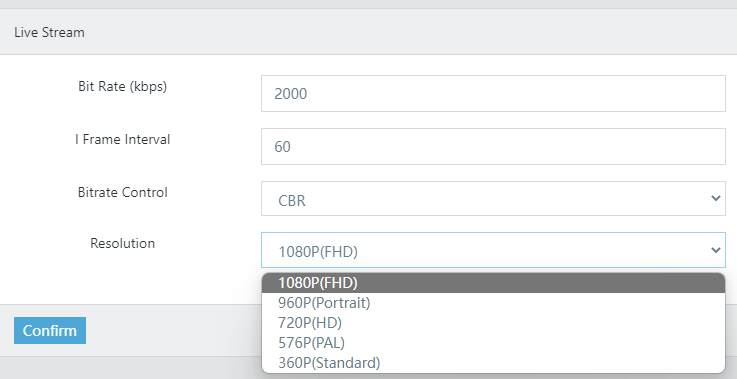
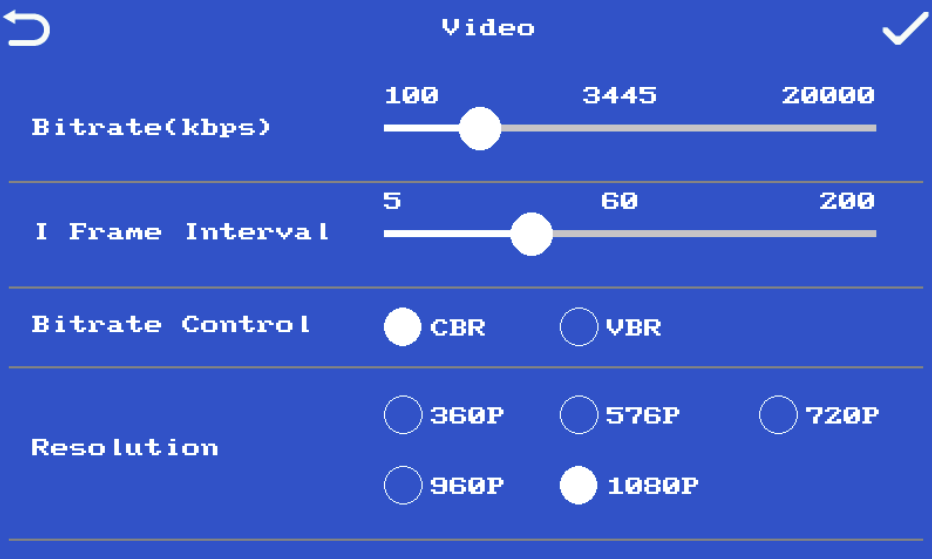

Table of Contents
