
-
General FAQ
-
4K Video Encoder/Decoder
-
- How to set up ZowieBox to connect with my equipments?
- How to supply power for ZowieBox?
- What is the login account and password
- Does ZowieBox support PoE?
- My computer can't find ZowieBox at NDI tool, what should I do?
- How to set the IP address for ZowieBox?
- How to connect with Nintendo Switch?
- How to reset ZowieBox?
- Will this save the settings after being disconnected from power?
- If I didn't have LAN, how can I visit ZowieBox?
- How to connect with PS5/4 ?
- How to connect with X-Box Series?
- ZowieBox Firmware Release Notes
- SDI ZowieBox Firmware Release Notes
- How to manually update firmware for ZowieBox?
- Instructions for NDI over WIFI
- How to change device name?
- Show all articles ( 2 ) Show all articles
-
- Why doesn't ZowieBox support decoding NDI sources from VLC, NDI, OBS, etc.?
- How to Decode NDI Source
- How to decode/encode SRT to ZowieBox using vMix
- How to use NDI Discovery
- How to upgrade with USB
- How to use the UVC to HDMI function
- How to use RTMP sever
- Does ZowieBox support saving video files to local disk?
- Is it possible to decode the NDI® stream emitted by another device using ZowieBox ?
- What is the latency from encoding to rendering when using ZowieBox to transmit 4K30 signal?
- Can in record to usb and encode at the same time?
- How to check recorder status?
- Device is hot, will it has any problem?
- Does ZowieBox support OSD?
- What is the latency from encoding to rendering when using ZowieBox to transmit 4K30 signal?
- Would this be usable by a gaming console? for example, is the HDMI passthrough (with no latency) while recording to YouTube?
- Does it support power pass through? Meaning can the ZowieBox accept or provide power through the USB-C?
- Can ZowieBox switch to a still image? Like jpeg that says be right back?
- How to switch to NDI mode
- Can it get multiple NDI feeds as input?
- How to switch to Decoder mode?
- How can I use ZowieBox connect to PTZ Camera?
- How to switch HDMI loop out and output?
- If ZowieBox didn't connect LAN, how can I control the record function?
- How can I power for Monitor or PTZ Camera by ZowieBox's DC out?
- How can I use X-Box to control the PTZ Camera via ZowieBox?
- How to use video recording
- What video formats can ZowieBox create?
- How do I fix the no signal problem when capturing a 4KP60 video from PS5?
- If nothing is captured on the preview screen, what should I do?
- If you use a 3.5 plug input for audio, will that audio also pass through the HDMI output?
- How to use ZowieBox connect to Zoom?
- How to set up PC display adapter settings when ZowieBox identifies the computer signal source as having an incorrect or unsupported resolution
- How to use NAS to save video file
- What is the WiFi for?
- What USB dongles does ZowieBox support?
- No Ethernet Port on Laptop, how to extend ethernet to use NDI?
- How to perform point-to-point(P2P) video transmitter and receiver by Lan
- How to perform point-to-point(P2P) video transmitter and receiver over the Internet
- Video file can not be viewed online
- Get RTSP streaming URL
- FEELWORLD L2 Plus Multi Camera Video Mixer Switcher output cannot be detected
- Why doesn’t ZowieBox recognize Mac mini’s signal?
- How to use SRTMiniSever for streaming
- How to discover ZoiwieBox’s NDI using OBS’s NDI plugin?
- How to modify AMD graphics card parameters to make ZowieBox output normal
- Recommendations for storage device speed
- How to switch output resolution in decoder mode
- How to recover ZowieBox if it works abnormally after the upgrade
- Why 4K60/4K50/1080p120/1080p100 input is recognized as 1080p60/50 input?
- The difference between New Gen ZowieBox and ZowieBox
- How to use AVoIP/UVC to NDI function
- How to use USB MIC
- Why is the image green or unavailable when input to the monitor/ATEM?
- How to upgrade Zowietek products?
- Upgrade Troubleshooting
- How to use NDI multicast?
- Hardware Version and Compatibility
- How to configure SRT related parameters?
- SDI Incompatible Devices
- How to use NDI Discovery Sever to achieve cross-segment encoding and decoding
- How to stream to OBS by SRT
- How to use VLC to pull SRT local stream?
- How to select level A or level B for 3G SDI output
- How to switch USB between host and device mode
- How to use ZowieAPI with Bitfocus Campanion and Stream Deck for scheduled recording
- How to use the UVC function of DJI
- How to use pocket3 to streaming to ZowieBox
- How to improve ZowieBox temperature/fan sound
- How to troubleshooting when ZowieBox has no signal when connected to PS5
- Whether Zowietek Products Support Decimal Resolution Input, Encoding, and Recording
- How to Use SRT Caller, Listener, and Rendezvous Mode
- Troubleshooting for audio and video asynchrony in video recording
- How to decode Resolume Arena's NDI source
- Show all articles ( 59 ) Show all articles
-
- How to get ZowieBox working in the OBS?
- Can ZowieBox stream to multiple destinations at once?
- Is it possible to decode the NDI® stream emitted by another device using ZowieBox ?
- Does this device support RTMP(S), the secure RST that facebook is now requiring?
- How to stream to YouTube
- How to stream to Facebook?
- How to stream to Wowza
- Can it store multiple steam keys for YouTube?
- How can I solve image and sound out of sync in OBS?
- How to get ZowieBox's video in vMix?
- Do you have to create an event on Facebook and YouTube before every stream or one key works every time if i plug it in the encoder?
- How to stream to Twitch?
- How to Use OSD Scoreboards
- How to use OSD timestamps
- Suggestions for audio asynchrony during streaming to YouTube
- How to troubleshoot when ZowieBox cannot decode NDI
- How to decode a local stream
- Show all articles ( 2 ) Show all articles
-
-
4K Video Recorder
-
- Quick Start Guide
- What is ZowieREC?
- Remote Control Layout Overview
- How to record video in 4K resolution?
- How to record RCA (CVBS) input?
- How to connect with PS5/4 ?
- How to connect with X-Box Series?
- How to connect with Nintendo Switch?
- Which video signals does ZowieREC support?
- How to re-pair the remote control?
- How to playback?
- Will this save the settings after being disconnected from power?
- Which input devices does ZowieREC support?
- What is the login account and password
- How to set the IP address for ZowieBox?
- How to upgrade firmware?
- ZowieREC Firmware Release Notes
- How to upgrade with USB
- Show all articles ( 3 ) Show all articles
-
- How are video segments split?
- How to check recorder status?
- Does ZowieREC support AV port DVD player?
- Does it support scheduled recording?
- Can it record 4K60 or 1080P120?
- How to login the ZowieRec's WEB Console?
- Does it support HDCP?
- How many KB/s does this record at? (bit rate)
- Can I use it as a DVR?
- Does the recorder support HDR?
- Does it support recording 4k60?
- Does it support 2.1 or 8k hdmi cables?
- Can HDMI output 4k?
- Can I hook this up to a console to play games?
- Can this be used for surveillance systems?
- How do I get the video and audio out of my high end TV into this box? Will the HDMI cable do that or are you using other mean to accomplish this?
- Does it capture 5.1 dolby audio?
- Can I pause my recording and restart the recording when I am taking a break?
- How to use NAS to save video file
- Can it record off dish network?
- Can I watch one program while recording another?
- Can I use this to record from iphone apps?
- How to record YouTube videos to USB storage device with ZowieREC?
- Can I record videos directly from a Smart TV?
- How to use ZowieAPI with Bitfocus Campanion and Stream Deck for scheduled recording
- I want for TV to record shows. Is this easy to use and easy to fast foward though the commericals?
- After recording to USB. Can I play to tv the one recording in USB ?
- Will this play a video previously recorded on a external hard drive from a dish network receiver?
- Does it support live streaming?
- How to use RTMP sever
- Device is hot, will it has any problem?
- How to switch to loopout mode
- If you use a 3.5 plug input for audio, will that audio also pass through the HDMI output?
- How can I power for Monitor or PTZ Camera by ZowieBox's DC out?
- Can it store multiple steam keys for YouTube?
- Can ZowieBox stream to multiple destinations at once?
- How to stream to Facebook?
- How to stream to YouTube
- How to stream to Wowza
- Whether Zowietek Products Support Decimal Resolution Input, Encoding, and Recording
- How to Use SRT Caller, Listener, and Rendezvous Mode
- Troubleshooting for audio and video asynchrony in video recording
- How to adjust the fan speed if ZowieREC feels hot?
- Show all articles ( 28 ) Show all articles
-
-
4K PTZ Camera
-
- PTZ Quick Start Guide
- How to Check ZowiePTZ’s IP Address
- How to install the ZowiePTZ by wall mount
- How to install the ZowiePTZ by ceiling mount?
- IR remote control shortcuts
- Equipment installation and connection
- Led Light
- My computer can’t find ZowiePTZ at NDI tool, what should I do?
- ZowiePTZ Firmware Release Notes
-
- Meaning of indicator lights
- Suggestion for different lens working distance
- ZowiePTZ operating temperature
- How to use Tally light
- How to switch to standby mode
- How to change the IP address of ZowiePTZ by IR remote control
- How to upgrade with USB
- How to restore camera’s default IP setting and password by IR remote control
- How to restore factory defaults by Remote control
- Why does the remote control sometimes not work?
- How to change the port of ZowiePTZ by IR remote control?
- How to use NAS to save video file
- How to use USB MIC
- Why is the image green or unavailable when input to the monitor/ATEM?
- How to improve the asynchrony of audio and video during recording
- Does ZowiePTZ support saving video files to local disk?
- How to use video recording
- How to use SRTMiniSever for streaming
- Recommendations for storage device speed
- Can ZowiePTZ stream to multiple destinations at once?
- Can it store multiple steam keys for YouTube?
- How can I solve image and sound out of sync in OBS?
- How to get ZowiePTZ working in the OBS?
- Do you have to create an event on Facebook and YouTube before every stream or one key works every time if i plug it in the encoder?
- How to upgrade Zowietek products?
- Upgrade Troubleshooting
- How to use NDI multicast?
- Hardware Version and Compatibility
- How to configure SRT related parameters?
- SDI Incompatible Devices
- How to use NDI Discovery Sever to achieve cross-segment encoding and decoding
- How to use VLC to pull SRT local stream?
- How to stream to OBS by SRT
- How to use ZowieAPI with Bitfocus Campanion and Stream Deck for scheduled recording
- Whether Zowietek Products Support Decimal Resolution Input, Encoding, and Recording
- How to Use SRT Caller, Listener, and Rendezvous Mode
- Troubleshooting for audio and video asynchrony in video recording
- Show all articles ( 22 ) Show all articles
-
- What are the possible ways I can control ZowiePTZ?
- How to use STREAM DECK to control the ZowiePTZ
- Supporting Xbox Joystick control
- How to make the remote control direction correspond to the pan/tilt rotation direction
- How to control ZoiwiePTZ by ZowiePTZ software
- How to control ZowiePTZ by ZowieBox
- How to control your ZowiePTZ by vMix
- Installing the OBS plugin to your windows PC to control ZowiePTZ by OBS
- How to control ZowiePTZ by BITFOCUS Companion
- How to use serial port to control ZowiePTZ
- Username and password of Onvif protocol
- How to use PTZ IP Controller to control ZowiePTZ
-
-
4K POV Camera
-
- ZowieCam operating temperature
- How to use OSD menu to adjust output resolution
- How to use Tally Light
- How to use shortcut functions
- How to use button to operate OSD menu
- How to check ZowieCam’s IP Address
- How to adapt the button direction to the output direction
- How to perform noise reduction
- How to flip the encoding screen
- How to flip the output screen
- How to set up when the color is incorrect
- Why sometimes using the OSD menu to modify parameters is not effective?
- How to record videos with ZowieCam
- How to switch to standby mode
- Why sometimes using the OSD menu to modify parameters is not effective?
- How to set up when the color is incorrect
- How to Use OSD Scoreboards
- How to use OSD timestamps
- How to use NAS to save video file
- How to stream to Twitch?
- How to stream to Wowza
- How to stream to Facebook?
- How to stream to YouTube
- Why is the image green or unavailable when input to the monitor/ATEM?
- Suggestions for audio asynchrony during streaming to YouTube
- How to change the lens?
- How to improve ZowieCam temperature/fan sound
- How to improve the asynchrony of audio and video during recording
- How to improve the jitter of the AF model ZowieCam
- How to correct the image blur in one corner for ZowieCAM M12 AF?
- Upgrade Troubleshooting
- How to use NDI multicast?
- Hardware Version and Compatibility
- How to configure SRT related parameters?
- SDI Incompatible Devices
- How to use NDI Discovery Sever to achieve cross-segment encoding and decoding
- How to stream to OBS by SRT
- How to use VLC to pull SRT local stream?
- How to switch USB between host and device mode
- How to use ZowieAPI with Bitfocus Campanion and Stream Deck for scheduled recording
- Whether Zowietek Products Support Decimal Resolution Input, Encoding, and Recording
- How to Use SRT Caller, Listener, and Rendezvous Mode
- Troubleshooting for audio and video asynchrony in video recording
- Show all articles ( 28 ) Show all articles
-
PTZ Controller
-
- Articles coming soon
-
- User manual
- How to Connect ZowieKBD to Network and Power?
- What are the ports on the back of the ZowieKBD used for?
- How are the buttons on the ZowieKBD organized?
- What are the shortcut button functions on ZowieKBD?
- What information is shown on the ZowieKBD screen?
- How do I navigate the ZowieKBD menu with the joystick or knob?
- How to Add an NDI Camera to ZowieKBD
- How to Add an ONVIF Camera to ZowieKBD
- How to Connect a Sony VISCA Camera to ZowieKBD
- How to Set Up a VISCA Over IP Camera on ZowieKBD
- How to Add a Serial Protocol Camera to ZowieKBD?
- How to Modify or Edit an Existing Camera in ZowieKBD?
- How to Add or Edit Camera Groups in ZowieKBD?
- How to Switch Between Active Cameras or Groups in ZowieKBD?
- How to Switch Display Modes or Output Priorities on ZowieKBD?
- How to Set, Call, or Reset Presets on ZowieKBD
- Show all articles ( 2 ) Show all articles
-
- User manual
- How to Connect ZowieKBD to Network and Power?
- What are the ports on the back of the ZowieKBD used for?
- How are the buttons on the ZowieKBD organized?
- What are the shortcut button functions on ZowieKBD?
- What information is shown on the ZowieKBD screen?
- How do I navigate the ZowieKBD menu with the joystick or knob?
- How to Add an NDI Camera to ZowieKBD
- How to Add an ONVIF Camera to ZowieKBD
- How to Connect a Sony VISCA Camera to ZowieKBD
- How to Set Up a VISCA Over IP Camera on ZowieKBD
- How to Add a Serial Protocol Camera to ZowieKBD?
- How to Modify or Edit an Existing Camera in ZowieKBD?
- How to Add or Edit Camera Groups in ZowieKBD?
- How to Switch Between Active Cameras or Groups in ZowieKBD?
- How to Switch Display Modes or Output Priorities on ZowieKBD?
- How to Set, Call, or Reset Presets on ZowieKBD
- Show all articles ( 2 ) Show all articles
-
- User manual
- Comparison of PTZ Controller Parameters
- Can I use two or three protocols to control different PTZ camera at same time?
- How to upgrade Zowietek products?
- Setting up your PTZ Network Controller
- How to search the camera by ONVIF
- How to set preset and call preset?
- How many presets (max) per camera can you set up?
- Can the controller be turned off when using POE?
- When the PTZ camera is mounted on the ceiling, I go right with the joystick the camera goes left and when I push the joystick to the left it goes. How can I fix this problem?
- Will this viewer work with 4k camera system?
- Does this controller support VISCA over IP ?
- Does the RS232 and RS485/422 work on this controller?
- Can the gateway IP address be changed?
- I tried to connect in the network but the Gateway IP address and DNS server could not be changed. Could you tell me how to change them?
- How to use PTZ IP Controller to control ZowiePTZ
- Show all articles ( 1 ) Show all articles
-
-
AI PTZ Camera
-
- How to use PTZ NDI Camera connect Skype, Zoom
- How to restore factory defaults
- How to restore camera’s default IP address,username and password?
- How to find PTZ IP address?
- Which video formats does PTZ compatible with BlackMagic devices?
- How to update the new firmware
- Does AI Tracking Camera supports ZowiePTZ?
- AI PTZ Camera(1080P Version) - HDMI & SDI output delay
- How to upgrade the firmware at MAC OS?
- How do I connect Mac PC to the AI PTZ camera?
- How to upgrade Zowietek products?
- How to use USB MIC
-
- How to get PTZ cameras working in OBS
- How to get PTZ cameras’ videos in vMix
- RTMP live streaming to YouTube directly from the AI PTZ camera
- RTMP live streaming to Facebook directly from the AI PTZ camera
- How to feed RTSP from ZOWIETEK PTZ cameras into some commonly used video mixing software (OBS, vMix)
-
PTZ Camera
-
- How do I set the PTZ camera to be on my network?
- How do I connect Mac PC to the PTZ camera?
- How to find PTZ IP address
- How to restore factory defaults
- Does this camera need the power adapter if I use a POE switch?
- How to restore camera's default IP address,username and password in IR remote control
- How to use PTZ NDI Camera connect Skype, Zoom
- How do I change the IP address of PTZ Camera?
- How to upgrade Zowietek products?
- How to use USB MIC
-
- How to use STREAM DECK to control the PTZ camera
- Installing the OBS plugin to your windows PC to control PTZ camera by OBS
- How to set VISCA/Pelco-D/Pelco-P protocol at PTZ controller and PTZ camera
- How to get PTZ NDI Camera working in NDI
- IR remote control shortcuts
- What are the possible ways I can control my PTZ camera?
- If I set a preset using the remote control, can I call that preset from the IP interface?
- Supporting Xbox Joystick control
- How to control your PTZ cameras by vMix
- How to control PTZ Camera by ZowiePTZ
- How to control PTZ camera by BITFOCUS Companion
-
- How to get PTZ cameras working in the OBS
- How to feed RTSP from ZOWIETEK PTZ cameras into some commonly used video mixing software (OBS, vMix)
- How do I use vMix to pull RTSP streams?
- How to pull stream through RTSP(VLC)
- RTMP live streaming to YouTube with PTZ camera
- RTMP live streaming to Facebook with PTZ camera
- How do I stream to YouTube live with vMix?
- How do I use OBS to push streams?
- How to get PTZ cameras’ videos in vMix
-
Streaming Encoder
-
- How to update the firmware?
- How to get a RTMP(S) URL?
- What cameras are compatible with the LiveV400?
- What platforms can I stream to with LiveV400?
- What resolutions and framerates can the LiveV400 stream?
- What to do if the video is not clear
- Is the LiveV400 supposed to run hot?
- The sound of the fan of LiveV400 affected me, how to solve this problem
- Does the LiveV400 support OSD?
- Is device video collage supported?
- How to get LIveV400’s Serial Number
- How to upgrade Zowietek products?
-
- The most important step to use the built-in 5G/4G(APN setting)
- Which bands(frequencies) does the LiveV400 support?
- Which 4G(LTE)USB dongle does the LiveV400 support?
- How to connect the LiveV400 to the internet
- How to bond
- Can the LiveV400 stream to multiple destinations at once?
- How to aggregate the network to make the live more smooth
- Preparation before pushing the stream
- How to use SIM card to connect to the network?
-
Surgical Video Camera
-
- How to connect the surgical video camera to my device?
- NDI Tool cannot search for the 4k surgical camera?
- How to supply power to the surgical camera?
- what is the login account and password of the surgical camera?
- How to reset the surgical camera?
- How to use the surgical camera?
- How to push streaming?
-
-
Medical Video Recorder
-
- What are the recommended USB device specifications?
- How to set the MediDVR clock
- Set the size and time of video clips
- How to capture the still images during video recording
- How to manually select the video source
- How to select the audio source
- How to playback the videos just recorded or stored on the MediDVR
- How to pull stream to view live video
-
- Troubleshooting
- Brief description of the MediDVR
- What video resolutions are supported?
- Set up the video input and resolution on the MediDVR
- Output formats supported by the MediDVR
- How to find the version information on the MediDVR
- How can I search patient data?
- Is it possible to playback / edit the video file on a computer?
- What is DICOM?
-
-
ZowieX
< All Topics
Print
How to set up when the color is incorrect
Views108
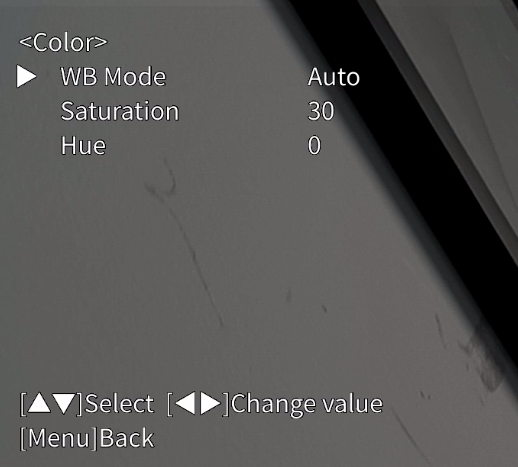
Method 1:
Click the Menu button on the IR remote control to call out the OSD menu, click [Camera]->[Color], set the white balance mode to Auto, saturation to 30, and hue to 0.
Method 2:
After logging into the web control interface, click Setting->Camera->Image->Color, set the white balance mode to auto, saturation to 30, and hue to 0.
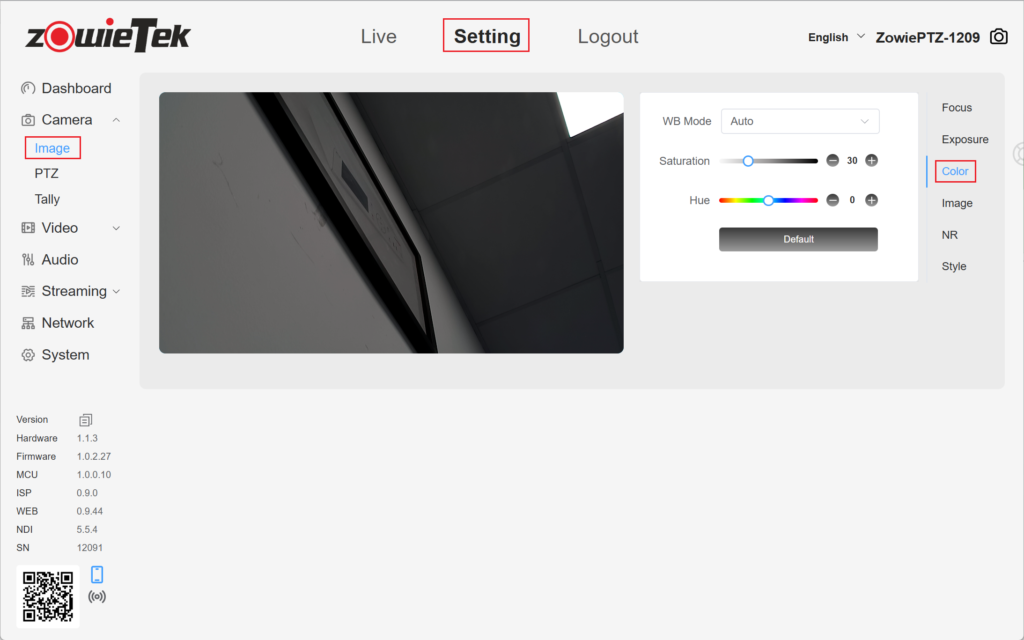
Table of Contents
