

To begin with, your camera will need to be connected to the network and adjust it according to your own network environment. Please make sure that your PTZ camera, router, and computer are in the same network segment. Instructions can be found HERE
You should install NDI tools, then running application, choose NDI Camera Video source. As shown in the figure.
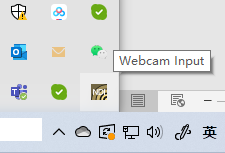
In the taskbar, select the “Webcam Input” button, click right key, Select the NDI HX device as the Webcam Input. For example: NDI-654495.

Add a ‘Video Capture Device’ Source.

Select the ‘NewTek NDI Video’ device.

Now you can see the videos in the OBS.
